.....Keep Calm And Enjoy With YourMu6.....
Recent Post
Showing posts with label android. Show all posts

របៀបតំឡើង WINDOW XP នៅលើ ANDROID

របៀបតំឡើង WINDOW XP នៅលើ ANDROID ងាយៗ


ថ្មីៗនេះ Android កំពុងតែមានសន្ទុះនៃការអភិវឌ្ឍន៍យ៉ាងលឿនបំផុត ។ ក្រុមហ៊ុន Android ក៏បានសម្លឹងមើលឃើញប្រទេសកម្ពុជាមានអ្នកប្រើប្រាស់ប្រព័ន្ធ Android ច្រើន ទើបធ្វើឲ្យ Developer 
របស់ក្រុមហ៊ុន Android សម្រេចចិត្តបន្ថែមភាសាខ្មែរនៅក្នុង Android ផងដែរ។ នៅក្នុងប្រព័ន្ធ Android 4.3/4.4 មានភាសាខ្មែរស្រាប់។

បើសិនជាទូរស័ព្ទលោកអ្នកមិនទាន់បានតំឡើងទៅកាន់ 4.3/4.4 ទេ សុំចុចទីនេះដើម្បី Update ។ ដូចនេះក្រុមអ្នកប្រើប្រាស់ Android កម្ពុជានឹងបង្ហាញពីរបៀប Boot Window XP Pack 3 នៅក្នុងទូរស័ព្ទ Android គ្រប់ Model ដែរមាន Ram ចាប់ពី 512MB ឡើងទៅ
តម្រូវការនៃការតំឡើង Window Xp

- Run Android
- Ram 512MB ឡើងទៅ
- អាចដំណើរការជាមួយ Samsung/sony/LG/HTC/......
+របៀបតំឡើង
ទាញយក DL.zip (Windows) 
- ទាញយក  Bochs2_5_1.apk 
«តំឡើង Bochs2_5_1.apk  នៅក្នុង Android Smart Phone របស់អ្នក ហើយកុំទាន់អាលបើក»
Extract SDL.zip រួចចម្លង Folder SDL ទៅកាន់ SD Card របស់អ្នក
ធ្វើការបើកកម្មវិធី Bochs វាហ្នឹង Run Auto ទៅកាន់ Window XP ។


Copy ទាំងស្រុងពី​ http://www.caugtalk.info

ទាញយក កម្មវិធី 魔漫相机 (Magic Man Camera) ជាភាសាខ្មែរ ដោយឥតគិតថ្លៃ(For Android Phone)


សួស្តី! បងប្អូនមិត្តអ្នកប្រើប្រាស់ទូរស័ព្ទ Android Smart Phones ទាំងអស់គ្នា
ថ្ងៃនេះខ្ញុំពិតជាសប្បាយ និងរីករាយជាមួយការចែករំលែកនូវកម្មវិធីមួយ  魔漫相机 (Magic Man Camera)  (កាំមេរ៉ាតុក្កតា) ជាភាសាខ្មែរ ។ បើតាមខ្ញុំដឹង ខ្ញុំយល់ឃើញកម្មវិធីនេះកំពុងនិយមខ្លាំងណាស់ សម្រាប់ចូលចិត្តថតរូប និងចង់បានអ្វីប្លែកៗ
ដើម្បីចែករំលែករូបថត របស់ខ្លួន តាម Facebook, Line, WeChat, Viber ជាដើម ...
កម្មវិធីថតមួយនេះ ជាកម្មវិធីរបស់ក្រុមហ៊ិមចិនមួយឈ្មោះ Bejing BSHN wenhua chuanbo Ltd.

ដំបូងឡើយកម្មវិធីបានជាកំណែ និងជាភាសាចិនតែ ប៉ុណ្ណោះ ។ បន្ទាប់មកក៏កែប្រែកំណែថ្មី
មានជាភាសាអង់គ្លេសផង ហើយថ្មីនេះ ឥឡូវមាន សហការគ្នាបកប្រែជាភាសាពី ភាសាចិន និងភាសាអង់គ្លេស មកជាភាសាខ្មែរវិញ រវាងមិត្តភក្តិតាម Facebook ពីនាក់គឺ កញ្ញា  Helena Coolgirl  និង លោក Chhoy Bun Sok Heng  អស់រយះពេលប្រហែលជា ២សប្តាហ៍ បូកទាំងកាត់ត អាយខន និងសម្រួលពាក្យជាខ្មែរសាមញ្ញ។ ពេលនេះពួកគេទទួលបានចេញ
លិទ្ធិផលមកហើយ និងដាក់ឲ្យុទាញយកប្រើប្រាស់ដោយឮឥតថ្លៃផង


តោះយើង សូមបងប្អូនទាញុយក និងប្រើប្រាស់ជាភាសាខ្មែរវិញម្តងម៉េចវិញ ?
បើស្រឡាញ់ គាំទ្រ អភិរក្ស និងចង់ចូលលើកកំពស់ភាសាជាតិខ្លួន សូមទាញយកនៅខាងក្រោម


ផ្ទាំងរូបភាពនៃកម្មវិធី


ទាញយក

របៀបតម្លើង
គ្រាន់តែលុបកម្មវិធីអាចាស់របស់អ្នកចេញ និងតម្លើងកម្មវិធីដែលបានទាញុយកវិញជាការស្រេច
ប្រសិនបើមិនលុបនោះមិនអាចបន្តការតម្លើងបានទេ (សូមមើលរូបខាងក្រោម) !

សូមរីករាយ
ឬប្រសិនបើមិនចេញមានអក្សរខ្មែរសូមមើល និង ធ្វើតាមវិឌីអូនេះ
ចុចត្រង់នេះដើម្បីមើល


ប្រភពដើមៈអាយកម្ពុជា

Root Galaxy S3 4.2.2 leaked+Install CWM+Khmer


For Samsung Galaxy S3 (I9300) on leaked Android 4.2.2 (XXUFME7).

These steps guide you to Root; install BusyBox and ClockworkMod recovery on your GS3 4.2.2.

Here I have organized the all the steps more simple and understandable.

Successful tested on my own Galasxy S3. 

Do understand, however, I cannot take any responsibility for any damage or brick to your device as a result of following these instructions. DO IT AT YOUR OWN RISK! 


----------------------------------------------------------------- 


*** Pre-requisites ***

1. USB Driver for GS3 http://goo.gl/6FWjw
(It should be installed already if you have Samsung Kies on PC) 

2. Enable USB Debugging Mode on the phone (Menu => Settings. In "More" section, select "Developer options" => Tick "USB debugging") 

3. Should have more than 80% of batery power.


-----------------------------------------------------------------


Steps to root:

1. + Download "GS3_Root.zip" 

    + Extract a file "CF-Root-SGS3-v6.4.tar" from the zip file that you just downloaded. 

2. Download Odin v3.07

3. + Power off the GS3.

    + Boot into Download Mode. (By pressing and holding Volume Down & Home buttons together, then press the Power button untill an a "Warning!!" message  appears, then press Volume Up to continue). 

4. Run Odin3 v3.07.exe as an Administrator.

5. + Connect the GS3 to computer using USB cable while it is in the Download Mode.

    + Wait a second until Odin detects your device.

    + Click on PDA button and select the CF-Root-SGS3-v6.4.tar file.

    + Tick "Auto-Reboot" and "F.Reset Time" in Odin, but do not tick "Re-Partition".


6. Click the Start button in Odin. The installation process should begin now and would take few minutes to complete.

Once the installation process is completed, the phone will restart automatically. You will seeSupperSU app in your phone.


-----------------------------------------------------------------


Install BusyBox & ClockworkMod Recovery (CWM) on your phone:

1. + Download "BusyBox Installer" from PlayStore.
       (Why install this? Becuase several root apps need it.)

    + Open BusyBox and press "Install". (Now you can uninstall BusyBox app if you want)

2. + Download "ROM Manager" from PlayStore.

   + Open ROM Manager and select Recovery Setup, then install ClockworkMod recovery. 

*** To boot into CWM recovery mode:
   + Power off your phone
   + Pressing and holding Volume Up & Home buttons, then Power on.


-----------------------------------------------------------------


Install Khmer Unicode & Keyboard

1. Download Khmer Unicode fonts. (Flash the zip file via CWM recovery)

2. Khandroid Khmer Keyboard. (Install APK file as normal app)

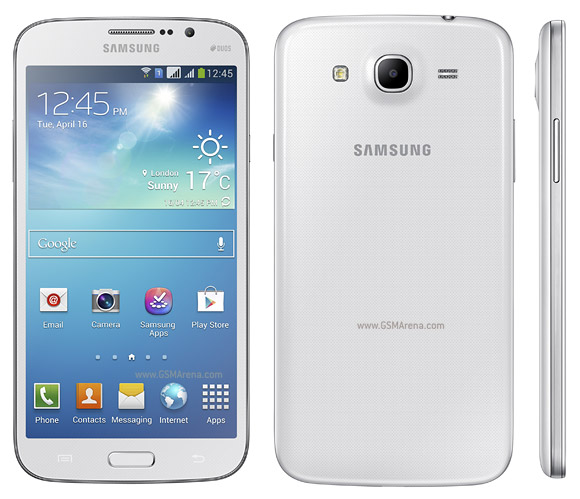
Font Khmer on Samsung Galaxy Mega5.8 GT-I9152 Duos


How to set font khmer on Samsung Galaxy Mega5.8 GT-I9152 Duos+require:

1- Odin3 //main.develoid.com:81/_multimedia/Samsung/
4- khmer font (khmer.ttf)+
how to do:
1-  turn off your phone and then go to download mode by press button power + home key + volume-down, Press Volume-Up Button to Continue
2- connect your phone to Computer
3-  open Odin(make sure port com in odin it has connected) click on PDA find a file I9152-JB_4.2.2-boot.tar, (no need to change anything on odin) press Start
4- copy root explorer & font khmer to SDcard, install root explorer
5- open root explorer copy font khmer to system/fonts (in root explorer must Mounted as r/w)
6- restart phone. Done!Note: only on Samsung GT-I9152,
 ខ្ញុំនឹងមិនទទួលខុសត្រូវរាល់បញ្ហាផ្សេងៗឡើយ គ្រាន់តែចង់ចែករំលែក។


(By Sokhom Phum from CAUG) 

Hack Money in Asphalt 8


Hack money in Asphalt 8 using GameKiller. 
Tested on my Galaxy S3!


Note: Restart your phone first in order to refresh your ram.


Here we go:

Step 1.  Open GameKiller

Step 2.  Open Asphalt8 and play the “Knockdown” level.

+ When you knocked down the 1st car, use GameKiller to search DWORD with number “1”. (You will get thousand of results).

+ When knocked down the 2nd car, search “2”.

+ When Knocked down the 3rd car, search “3”

[…]

+ Continues do it until you get less results in GameKiller list (Ex. When you knocked down the 7th or 8th car, then you will have six or seven results in the list).

Step 3. Still in GameKill, modify all those results to the number you want (Ex. 9999999).

Step 4. Back to the game, then you will won the racing automatically and get the money 9999999.


--------------------------------------------------------------


ចំណាំ: បិទបើកទូរស័ព្ទដើម្បី refresh ram


ចាប់ផ្ដើម៖

ជំហ៊ានទី 1. បើកកម្មវិធី GameKiller

ជំហ៊ានទី 2. បើក Asphalt8 ហើយលេងវគ្គបុកគ្នា “Knockdown”.

+ ពេលបុកបានឡានទី ១, ប្រើ GameKiller ដើម្បី search DWORD ជាមួយនឹងលេខ “1”. (អ្នកនឹងទទូលបានលទ្ធផលជាច្រើនក្នុងតារាង).

+ ពេលបុកបានឡានទី ២, search លេខ “2”.

+ ពេលបុកបានឡានទី ៣, search លេខ “3”

[…]

+ បន្តធ្វើបែបនេះរហូតទាល់តែអ្នកទទួលលទ្ធផលតិចតួចក្នុងតារាង GameKiller (Ex. ពេលបុកបានឡានទី ៧ ឬទី ៨, នោះអ្នកនឹងទទួលលទ្ធផលតិចនៅក្នុងតារាងហើយ ប្រហែលជា ៦ ទៅ ៧ ជួរក្នុងតារាង).

ជំហ៊ានទី 3. ក្នុង GameKill ដដែរ, កែរប្រែតំលៃដោយ "modify all" នូវលទ្ធផលទាំងនោះទៅតាមលេខដែលអ្នកចង់បាន (Ex. 9999999).

ជំហ៊ានទី 4. ត្រឡប់ទៅលេងហ្គេមវិញ, អ្នកនឹងឈ្នះហ្គេមដោយស្វ័យប្រវត្ត ហើយទទួលបានលុយ 9999999.

(By Steven Khan from CAUG)

ដាក់ខ្មែរលើ Galaxy S3 Mini ដោយមិនបាច់Root


*លោកអ្នកត្រូវការ:


វិធី Flash CWM:

1 : ចូលទៅកាន់ Setting > Developer Options > USB Debugging (Tick)

2
: Boot ចូលទៅក្នុង Download Mode ត្រូវបិទទូរសព្ទ័ ហើយ Press and Hold
Volume Down Button+Power Button + Home Button ។ បន្ទាប់មកវានឹង boot
ទៅផ្ទាំងខ្មៅមួយដែលមាន Message អោយយើងធ្វើការ Press Volume-Up Button to
Continue

3 : ភ្ជាប់ទូរស័ព្ទរបស់អ្នកជាមួយ USB wire និងបើកកម្មវិធី Odin នៅលើ Computer

: ចុច PDA Button ដើម្បី browse ទៅរក recovery.tar រួចចុច Open
ចុច Start Button នៅលើកម្មវិធី Ordin ជាការស្រេច ។


ដំឡើងខ្មែរយូនីកូដ

1 : copy khmer style ទៅ internal SD card

2 : ដំឡើង khmer style តាម
CWM:បិទទូរសព្ទ័ ហើយចុច Home button +Power button+ volume Up button
ស្របពេលតែមួយអោយជាប់ ពេលឃើញ Samsung Galaxy S3 Mini logo
ត្រូវឈប់ចុចប៊ូតុងទាំងអស់ បន្ទាប់មកយើងនឹងឃើញ CWM-6 ប្រើ volume up និង
volume down ដើម្បីរើស.

3 : install zip from SD card > choose zip from internal SD card ស្វែងរក khmer styleដែលអ្នកបានCopyទុក ហើយ install the khmer style បន្ទាប់មកreboot ជាការស្រេច ។
**********សូមឲ្យទទួលបានជោគជ័យ*********

(By  Sokheng Keat from CAUG)

Root Sony Xperia S Lt26i JB 6.2.B.1.196+Khmer Unicode

Root Sony Xperia S Lt26i JB 6.2.B.1.196+Khmer Unicode


តម្រូវការ៖
  1. ត្រូវ Unlock Bootloader
  2. FLashtool
  3. Firmware Jelly Bean 6.2.B.1.196 ទីនេះ http://d-h.st/e0a
  4. Kernel 6.2.B.0.211 ទាញយកទីនេះhttp://www.mediafire.com/download/556gj04qqc5949p/XperiaS_LT26i_6.2.B.0.211_KernelOnly.ftf
  5. Kernel 6.2.B.1.196 ទាញយកទីនេះhttp://www.mediafire.com/download/66587ux5868mii8/XperiaS_LT26i_6.2.B.1.96_KernelOnly.ftf
  6. Easy Root Toolkit 18.0 ទាញយកទីនេះhttp://www.mediafire.com/download/9g7h3ehkqaqa4ms/DooMLoRD_Easy-Rooting-Toolkit_v18_perf-event-exploit.zip
  7. CWM6-CDM V2.2 ទាញយកទីនេះhttp://www.mediafire.com/download/3reyj572l2ag4dg/CWM6-cDM_v2.2-DooMLoRD-Xperia_S-JB.zip
  8. ពុម្ពអក្សរខ្មែរ សំរាបើ Jelly Bean 4.1.2 ទាញយកទីនេះhttp://www.mediafire.com/download/6pm54qq19uheqb8/khmer_Unicode_for_JB_4.1.2.zip
របៀបអនុវត្តន៍
  • ដំឡើង Flashtool និង ADB USB
  • ដំណើរការ Flashtool Flash Firmware 6.2.B.1.196 (3)
  • ដំណើរការ (បើកទូរស័ព្ទ) ចូលទៅកាន់ Setting >> Developer Option "On" >> Tick "USB Debugging" បន្ទាប់ចូលទៅ Security >> Tick "Unknow Sources" រួចបិទទូរស័ព្ទ
  • ទាញយកចំណុច (4) Flash Kernel 6.2.B.0.211 ដោយ ដំណើរការ Flashtool ជ្រើសរើស Flash >> Flashmode >>ជ្រើសរើស Kernel 6.2.B.0.211 >> Ok នៅពេលចប់ ដំណើរការទូរស័ទ្ទ
  • ទាញយក Easy Root Toolkit (6) ចុច Rumme_win ភ្ជាប់ទូរស័ព្ទទៅ PC (Skip PC Companion និងRemind Update) នៅពេលទូរស័ព្ទ ដំណើរការឡើងវិញ ត្រូវពិនិត្យ មើលតើមាន SuperSU (បើមានគឺ Root បានសំរេច)
  • បិទទូរស័ព្ទ Flash Kernel 6.2.B.1.196 (ដូច Flash Kernel 26.2.B.0.211 ដែរ)
  • ទាញយក CMW6-CDM V2.2 (7) ពន្លារួច ចុចលើ CMW6-Instal-en ចុច Enter 3 ដងចាំបន្ដិច រួចភ្ជាប់ទូរស័ព្ទទៅ PC នៅពេលដំណើរការចប់ 
  • ទាញយក ពូម្ពអក្សរខ្មែរ (8) ចំលងដាក់ក្នុង SDCard បិទទូរស័ព្ទ រួចបើក ហើយ Hold Volume down ដើម្បីចូលទៅ Recovery ជ្រើសរើស install zip from SD card > choose zip from internal SD card ជ្រើសរើសពុម្ពអក្សរ  នៅពេលចប់ត្រូវ Reboot ជាការស្រេច
ទទួលខុសត្រូវដោយខ្លួនឯង និងចាំថាខ្លួនកំពុងធ្វើអ្វី
(By Loy Bearna from CAUG)


[Android] ROM Galaxy Note Korea SHV-E160L Full Khmer Keyboard & Menu No Password

[Android] ROM Galaxy Note Korea SHV-E160L Full Khmer Keyboard & Menu No Password


Ads not by this site

***Note*** For E160L Only.
ROM Download From Here
1 Click By Odin: Download From Here
Password rar: Khmer7.net
Thank Bro Chan Rattanak For Make This ROM.
Join Group: https://www.facebook.com/groups/570735599639749/ 

Kingo Android ROOT

Kingo Android ROOT


Android ROOT គឺជាកម្មវិធីឥតគិតថ្លៃមួយនឹងគ្មានការចោទប្រកាន់ណាមួយ.
កម្មវិធីដែលមានសុវត្ថិភាពនិងមានសុវត្ថិភាពបំផុតដោយគ្មានហានិភ័យ.
Android ROOT ងាយស្រួលក្នុងការប្រើប្រាស់.
គាំទ្រស្ទើរតែរៀងរាល់ឧបករណ៍ Android និងកំណែរបស់ប្រព័ន្ធប្រតិបត្តិការ Android ទាំងអស់.


ទំហំឯកសារ: 23.68MB
ទាញយក

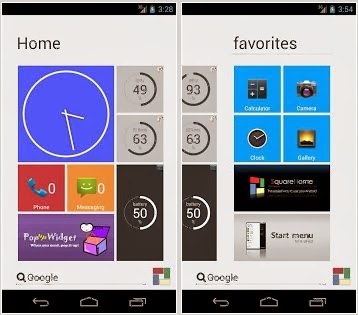
SquareHome beyond Windows 8.1 កម្មវិធីសំរាប់ Android

SquareHome beyond Windows 8.1 កម្មវិធីសំរាប់ Android


’SquareHome’ is a new launcher application with Windows 8 styles.
Enjoy the usability and beauty beyond Windows 8.

You can use the following features very intuitively with ’SquareHome’.

- create a tile by dragging an application, shortcut or widget.
- resize the tile by dragging right-bottom corner.
- control the size of widget in a tile by clicking the centeral button when resizing it.
- change the style and form of a tile.
- so many forms are supported: auto image, custom image, CPU load, available memory, battery level, missed calls, unread messages, unread Gmails, date/time…
- apply a theme or icon pack easily.
- make group of tiles and set the group label by tapping the header of it.
- create a folder by dragging the group header.
- easy search for applications, shortcuts and widgets.
- hide useless applications.
- assign behaviors to many gestures.
- other many intuitive features.

I do not explain long. Give it a try. :)

Keyword: Windows 8, Metro UI, launcher, theme


ទំហំឯកសារ: 490.99KB
ទាញយក